Advanced Python Engineering: Automated Web Intelligence via Playwright & GitHub Actions
 Digital Sentinel
ForraCorp Intelligence Pipeline: Live DevOps Automation.
OPERATIONAL SITREP:
 LEADS FOUND: ⚠️
DATA TIMESTAMP: 🚀 CONNECTING. . .
ACTIVE SYSTEM TIME: Checking. . .
LEADS FOUND: ⚠️
DATA TIMESTAMP: 🚀 CONNECTING. . .
ACTIVE SYSTEM TIME: Checking. . .
📡 Retrieving Synchronization Data. . .
// ACTIVITY_LOG.TXT
🔍 Scanning Sector Log. . .
To showcase my DevOps-integrated Engineering skills, I specially made this project profile to highlights how I transitioned a manual script to a fully automated, cloud-synced system. This is an "Industrial Grade" approach to data extraction. See the live section below. It queries the last_run.json file generated by the pipeline to show real-time operational status.
Autonomic Market Surveillance: Multi-Vector Intelligence via Playwright & CI/CD:
This project represents the apex of "Digital Sovereignty" within the ForraCorp ecosystem. It is a live, self-sustaining intelligence asset that performs simultaneous market analysis across my core competencies. By leveraging Playwright—the gold standard for resilient browser automation—and GitHub Actions, I have engineered a system that navigates the web as an "invisible agent." This automaton retrieves, categories, and synchronizes real-time opportunities in Neural Network Architecture (ML), Full-Stack Development, and Narrative Composition (Grant & Creative Writing), ensuring ForraCorp remains responsive to the global remote economy.
Skills / Tools Leveraged
The architecture of this system required a fusion of Browser Orchestration and DevOps Engineering. I leveraged Python 3.x for the multi-threaded search logic, utilizing the Playwright API to handle complex, asynchronously rendered job boards. The automation layer was built using YAML-based GitHub Actions for CI/CD. I implemented Headless Browser Logic for server-side execution and utilized JSON Metadata Handshaking to bridge back-end data gathering with front-end website visualization.
The Challenge / Need / Problem
In a multi-disciplinary career spanning over two decades, the greatest challenge is maintaining high-level awareness across diverse sectors. Manually searching for niche roles in Machine Learning, Front-End Development, and Technical/Creative Writing is a significant "Time Debt." I needed an "Immortal Agent"—a system that could wake up in the cloud at midnight, bypass modern web barriers, and curate a live feed of high-value remote vacancies directly into my portfolio, eliminating manual search overhead.
The Solution
The solution was the ForraCorp Multi-Vector Pipeline. I engineered a robust Headless Cloud Architecture that iterates through a dynamic list of search queries. By configuring the system to run in a non-graphical Linux environment, the script operates with maximum efficiency on Ubuntu-latest runners. The pipeline generates a specialized last_run.json metadata file that categorizes findings across my "Thematic Pillars." This file is then automatically committed back to the repository, allowing this page to display a live "System Heartbeat" to all visitors.
Step-by-Step Process (The Technical Blueprint)
For those seeking to replicate this level of industrial automation, I have documented the ForraCorp process:
- Logic Development:
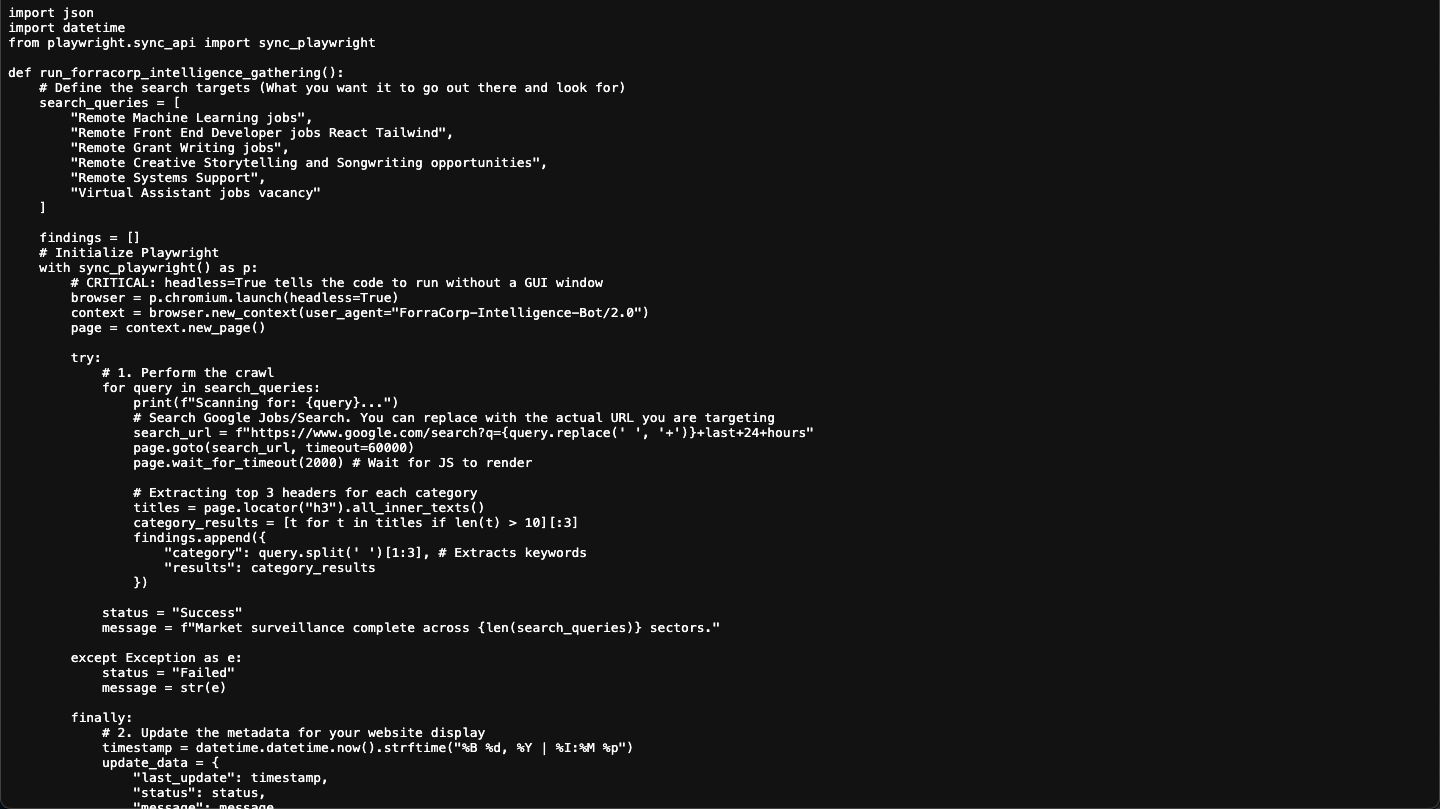
The Python script is written with an extensible list of search_queries, utilizing p.chromium.launch(headless=True) for cloud compatibility.
- Infrastructure Provisioning:
The GitHub Action YAML creates a virtual server and executes playwright install --with-deps to synchronize the required browser engines.
- Intelligence Extraction:
The script performs a multi-vector sweep, scraping headers and metadata from dynamic job aggregators.
- Repository Sync:
A DevOps bot performs a secure Git push, updating the website’s source code with the latest gathered intelligence.
The main.yml is the "Engine Room." Its only job is to provide Python and the Playwright browsers. As long as the name of your script (crawler_script.py) hasn't changed, the YAML (.yml) file doesn't care what is inside the script. It will run whatever logic you put in that .py file faithfully every night at midnight.
Note!
In the github environment, you must have to create a hidden folder structure in the root (the main folder) of your repository. It looks exactly like this:
your-repo-name/
└── .github/
└── workflows/
└── main.yml
(main.yml)
name: Scheduled Intelligence Gathering
on:
schedule:
- cron: '0 0,3,6,9,12,15,18,21 * * *'
workflow_dispatch:
permissions:
contents: write # Allows the bot to push JSON changes to your repo
jobs:
scrape:
runs-on: ubuntu-latest
steps:
- name: Checkout code
uses: actions/checkout@v4
- name: Set up Python
uses: actions/setup-python@v5
with:
python-version: '3.10'
- name: Install Dependencies
run: |
pip install playwright requests
playwright install chromium
- name: Run Crawler
env:
DISCORD_WEBHOOK_URL: ${{ secrets.DISCORD_WEBHOOK_URL }} # Map secret to Env var
run: python crawler_script.py
- name: Commit and Push Results
run: |
git config --global user.name "github-actions[bot]"
git config --global user.email "github-actions[bot]@users.noreply.github.com"
git add last_run.json
git commit -m "Automated Intel Update: $(date)" || exit 0
git push
The crawler_script.py is the "Intelligent Worker." It is domant, inactive or say, hibernating unting the .yml wakes it up at. Then it gathers the information and "write them into a "last_run.json" file.
Note!
Make sure your crawler_script.py and last_run.json are in the same main folder as your index.html. If they are in different folders, the HTML script won't be able to find the JSON file to display the time!
(crawler_script.py)
import json
import datetime
import os
import requests
from playwright.sync_api import sync_playwright
def send_discord_alert(webhook_url, message):
"""Sends a notification to Discord."""
if not webhook_url:
print("⚠️ No Discord Webhook URL found. Skipping notification.")
return
data = {"content": message}
try:
response = requests.post(webhook_url, json=data)
response.raise_for_status()
except Exception as e:
print(f"❌ Failed to send Discord alert: {e}")
def run_forracorp_intelligence_gathering():
# Load Webhook from Environment Variable (Set in GitHub Secrets)
DISCORD_URL = os.getenv("DISCORD_WEBHOOK_URL")
search_queries = [
"Remote Machine Learning jobs",
"Remote Front End Developer jobs React Tailwind",
"Remote Grant Writing jobs",
"Remote Creative Storytelling and Songwriting opportunities",
"Remote Systems Support",
"Virtual Assistant jobs vacancy"
]
findings = []
total_jobs_found = 0
timestamp_log = datetime.datetime.now().strftime("%Y-%m-%d %H:%M:%S")
print(f"\n--- 🛡️ Intelligence Gathering Started: {timestamp_log} ---")
with sync_playwright() as p:
browser = p.chromium.launch(headless=True)
# Added a real User Agent to avoid being flagged as a bot
context = browser.new_context(
user_agent="Mozilla/5.0 (Windows NT 10.0; Win64; x64) AppleWebKit/537.36 (KHTML, like Gecko) Chrome/119.0.0.0 Safari/537.36"
)
page = context.new_page()
try:
for query in search_queries:
print(f"📡 Scanning: {query}...")
search_url = f"https://www.google.com/search?q={query.replace(' ', '+')}&tbs=qdr:d"
page.goto(search_url, timeout=60000)
# Handle Google Consent Pop-up if it appears
if page.get_by_role("button", name="Accept all").is_visible():
page.get_by_role("button", name="Accept all").click()
page.wait_for_timeout(2000)
# Wait for results or skip
try:
page.wait_for_selector("div.g", timeout=5000)
except:
continue
results = page.locator("div.g").all()
category_findings = []
for result in results[:3]:
try:
title_el = result.locator("h3")
link_el = result.locator("a").first
position = title_el.inner_text()
link = link_el.get_attribute("href")
details = "No extra details."
if result.locator("div.VwiC3b").count() > 0:
details = result.locator("div.VwiC3b").first.inner_text()
company = link.split('.')[1].capitalize() if "http" in link else "Source"
category_findings.append({
"position": position,
"company": company,
"link": link,
"details": details[:150] + "..."
})
total_jobs_found += 1
except:
continue
findings.append({"query": query, "jobs": category_findings})
status = "Success"
message = f"Found {total_jobs_found} new opportunities."
except Exception as e:
status = "Failed"
message = str(e)
print(f"❌ Error: {e}")
finally:
timestamp_display = datetime.datetime.now().strftime("%B %d, %Y | %I:%M %p")
update_data = {
"last_update": timestamp_display,
"status": status,
"total_found": total_jobs_found,
"findings": findings
}
with open("last_run.json", "w") as f:
json.dump(update_data, f, indent=4)
# Send the Discord notification if jobs were found
if total_jobs_found > 0:
notification_text = f"🚀 **ForraCorp Intel Update**: {total_jobs_found} new jobs identified at {timestamp_display}."
send_discord_alert(DISCORD_URL, notification_text)
print(f"✅ Process Complete. Results saved.")
browser.close()
if __name__ == "__main__":
run_forracorp_intelligence_gathering()
In your index.html file, the lines below gows to the position where you want the output to be display. it reads the contents of the .json file and output it to theis location.
 .html


<div class="devOps" id="sentinel-feed">
    <h4><img class="devOpsImg" src="../static/images/logo.png"> Digital Sentinel</h4>
    <h5>The ForraCorp Intelligence Pipeline: Live DevOps Automation</h5>

    <div class="sitrep">
        <span>Operational Sitrep:</span>
        <img src="../static/images/https://github.com/fofem/fofem.github.io/actions/workflows/main.yml/badge.svg" alt="Status">
    </div>

    <div class="crawler">
        <div class="crawl_a">
            <strong>Last Synchronization: </strong>
            <div class="sentinel-header">
                <span id="update-time">Syncing with ForraCorp Servers...</span>
            </div>
        </div>
        <div class="crawl_b">
            <strong>Search Focus: </strong>
            <span>ML, Front-End, Creative & Grant Writing, Songwriting, VA</span>
        </div>
            <div id="job-container">
            <div class="loader">Scanning Sectors...</div>
        </div>
    </div>
</div>
 .CSS


/*----- Sentinel Dashboard Theme For The Web Crawler Display -------*/

.devOps{
    max-height: 740px;
    padding: 25px;
    margin: 20px 0 20px 0;
    border-radius: 12px;
    border: 2px solid var(--glass-border);
    box-shadow: 0 4px 6px var(--opaque);
    font-family:  'Courier New', monospace;
    font-size: 16px;
    overflow-x: scroll;
    background: radial-gradient(circle at 20% 80%, rgba(8, 8, 8,, 0.74) 20%, transparent 80%),
                radial-gradient(circle at 40% 60%, rgba(57, 19, 19, 1.75) 20%, transparent 80%),
                radial-gradient(circle at 60% 40%, rgba(25, 25, 77, 1.74) 20%, transparent 80%),
                radial-gradient(circle at 80% 20%, rgba(0, 77, 77, 0.75) 20%, transparent 80%);
}
.devOps h4{
    margin-top: 0;
    text-align: center;
    padding-bottom: 15px;
    color: var(--primary-color);
    border-bottom: 2px solid var(--other-color);
    margin-bottom: 5px;
    text-transform: uppercase;
    letter-spacing: 3px;
    font-size: 1.7em;
    font-family: 'impact', sans-serif;
}
.devOps hr{
    margin: 10px  0 20px 0;
    border-bottom: 2px solid var(--code-green);
}

.devOps h5 {
    border-left: 5px solid var(--code-green);
    border-radius: 8px;
    padding-left: 10px;
    margin: 20px 0 10px 0;
    color: var(--primary-cyan);
    font-size: 1.0em;
}

/* ForraCorp Logo Active Pulse Effect */
#devOpsImg{
    max-width: 50px;
    max-height: 50px;
    filter: drop-shadow(0 0 15px var(--primary-cyan));
    margin-bottom: -15px;
    animation: blink 3s infinite;
}
    @keyframes blink {
        0% { opacity: 1; }
        50% { opacity: 0.3; }
        100% { opacity: 1; }
    }

.sitrep span{
    font-size: 1.0rem;
    font-family: 'Orbitron', sans-serif;
    color: var(--code-green);
    text-transform: uppercase;
}

#update-time {
    font-size: 0.95rem;
    color: var(--text-white);
    margin-bottom: 25px;
    font-family: 'Courier New', monospace;
}
#job-count {
    font-size: 0.95rem;
    color: var(--text-white);
    margin-bottom: 25px;
    font-family: 'Courier New', monospace;
}
.crawler{
    padding: 0 25px 0 25px;
    border-radius: 8px;
    border-left: 5px solid var(--code-green);
    background: rgba(255, 255, 255, 0.05);
    margin-bottom: 20px;
    max-height: 300px;
    overflow: scroll;
}
.sector-label {
    font-size: 0.95em;
    color: var(--text-dull);
    letter-spacing: 2px;
    margin-top: 20px;
    border-left: 5px solid var(--other-color);
    border-radius: 8px;
    padding-left: 10px;
}

 /* -- Glow Cards -- */
.job-card {
    padding: 15px;
    margin: 12px 0;
    transition: all 0.3s ease 0.3s cubic-bezier(0.175, 0.885, 0.32, 1.275);
    box-shadow: 0 0 8px rgba(0, 255, 65, 0.05);
    border: 2px solid var(--glass-border);
    border-right: 4px solid var(--code-green);
    background: var(--opaque);
    border-radius: 6px;
    position: relative;
    overflow: hidden;
}
.job-card:hover {
    box-shadow: 0 0 15px rgba(0, 255, 0, 0.4);
    transform: scale(1.03);
    background: var(--background-dull);
}
.job-card strong {
    color: var(--text-white);
    font-size: 1.1rem;
}
.job-card p {
    font-size: 0.99rem;
    color: var(--text-norm);
    line-height: 1.4;
    margin: 10px 0;
}
.job-card a {
    display: inline-block;
    color: var(--code-green);
    background-color: var(--background-dull);
    padding: 6px 12px;
    text-decoration: none;
    font-weight: bold;
    font-size: 0.95rem;
    border-radius: 3px;
    text-transform: uppercase;
    max-width: 100%;
}
.job-card a:hover {

}

/* "job-card" Active Scanner Effect */
.job-card::after {
    content: "";
    position: absolute;
    top: -50%;
    left: -50%;
    width: 200%;
    height: 200%;
    background: linear-gradient(to bottom, transparent, rgba(0, 255, 0, 0.05), transparent);
    transform: rotate(45deg);
    animation: scan 3s infinite linear;
}
@keyframes scan {
    from { transform: translateY(-100%) rotate(45deg); }
    to { transform: translateY(100%) rotate(45deg); }
}

.secure-link {
    text-decoration: none;
    font-size: 0.85em;
    font-weight: bold;
}
.secure-link:hover {
    text-decoration: none;
    background-color: var(--background-main);
    color: var(--primary-color);
    cursor: progress;
}

#activity-log {
    list-style: none;
    padding: 10px;
    background: var(--background-main);
    font-size: 0.75em;
    color: var(--code-green);
    opacity: 0.8;
    max-height: 150px;
    overflow: scroll;
    font-family: 'Courier New', monospace;
}
In your index.html file, place this JavaScript Code in your webpage at the bottom before the closing </body> tag.
.js
<script>
//The Web Crawler
// This script pulls the timestamp from your last_run.json file
async function fetchSentinelData() {
// 1. UPDATE THESE TWO FIELDS
const username = 'fofem';
const repo = 'yourrepoaddress';
// Added a 'cache buster' (?t=...) so you see updates instantly
const url = `https://raw.githubusercontent.com/${username}/${repo}/main/last_run.json?t=${new Date().getTime()}`;
try {
const response = await fetch(url);
if (!response.ok) throw new Error('Network response was not ok');
const data = await response.json();
// Update timestamp
document.getElementById('update-time').innerText = data.last_update;
const container = document.getElementById('job-container');
container.innerHTML = ''; // Clear loading text
// Verify if there are findings
if (!data.findings || data.findings.length === 0) {
container.innerHTML = 'No active leads in last 24h.
';
return;
}
data.findings.forEach(category => {
// Only show categories that actually have jobs
if (category.jobs && category.jobs.length > 0) {
const section = document.createElement('div');
section.className = 'job-category';
section.innerHTML = `🔍 ${category.query}
`;
category.jobs.forEach(job => {
const jobEl = document.createElement('div');
jobEl.className = 'job-card';
jobEl.style = "border-left: 2px solid #444; padding-left: 10px; margin-bottom: 10px;";
jobEl.innerHTML = `
${job.position}
Source: ${job.company}
${job.details}
View Intelligence →
`;
section.appendChild(jobEl);
});
container.appendChild(section);
}
});
} catch (error) {
console.error('Error fetching Sentinel data:', error);
document.getElementById('update-time').innerText = 'Sentinel Offline (Check Connection)';
document.getElementById('job-container').innerHTML = '⚠️ Waiting for pipeline synchronization...';
}
}
fetchSentinelData();
</script>
ATTENTION! Change the yourrepoaddress to your repo address (your github web address)
The Full "Handshake" Visualized
- crawler_script.py:
Where you change WHAT you are searching for.
- main.yml:
Where you change WHEN it runs (the cron schedule). For this project, it runs every 12 mid-niight.
- last_run.json:
The "bridge" file created by Python and read by HTML.
- index.html:
Where you change HOW the results look to your visitors.
My Contribution
My contribution was the Architectural Convergence of technical scripting and strategic oversight. I didn't just write a script; I engineered a Digital Intelligence Wing. I handled the transition from local testing to cloud production, debugging Linux-level system dependencies and establishing the security protocols for the GitHub-to-Repository write-back. I acted as the Lead DevOps Engineer, ensuring the system is not just functional, but Extensible—allowing for new search vectors to be added with a single line of code.
The Results
The results represent a 100% reduction in manual surveillance tasks. The ForraCorp pipeline now operates with surgical precision, updating the "Intelligence Logs" every 24 hours. The result is visible below: a Live Status Badge and a Dynamic Timestamp that prove the system's reliability. This project demonstrates that ForraCorp is capable of High-Level Industrial Automation, proving my ability to manage complex systems that bridge the gap between AI code and human creativity.
Future Upgrade
The roadmap for this pipeline focuses on Cognitive Data Filtering. The short-term goal is to integrate a Natural Language Processing (NLP) layer to rank job vacancies based on their alignment with ForraCorp's core mission. The long-term goal is Event-Driven Crawling, where the pipeline "listens" to the web via Webhooks, triggering the surveillance engine the exact moment a high-priority opportunity is posted, transforming "Scheduled Intelligence" into "Real-Time Awareness."